
Vibro Shaper Vibration Plate Navod
PDF manuál · 40 stránok
Slovenčina



Rýchla kontrola
Nesprávna odpoveľa, skuste to znova.
Chatujte so svojím návodom Vibro Shaper Vibration Plate pomocou AI
Získajte okamžité AI odpovede z vášho Vibro Shaper Vibration Plate manuálu
Opýtajte sa čokoľvek o Vibro Shaper Vibration Plate. Odpovede vychádzajú z tejto príručky s uvedením zdrojových stránok.
Vibration Plate Harmonogram údržby
Uistite sa, že je vypínač vypnutý a kábel je odpojený zo zásuvky pred čistením.
Na odstránenie prachu zariadenia použite čistú suchú metlu alebo kefu.
Vyčistite stojacu plochu vlhkou handrou.
Vyčistite diaľkový ovládač čistou handrou.
Ak sa zariadenie dlhší čas nepoužíva, uskladnite ho v krabici na chladnom a suchom mieste a vyberte batérie z diaľkového ovládača.
Položte otázku
Odporúčate Vibration Plate?
Áno NieOdporúčate Vibration Plate?
Áno NieČasto kladené Otázky
Je navrhnutá na podporu domácich tréningov založených na vibráciách, ktoré môžu používateľom pomôcť trénovať rovnováhu, vytrvalosť a aktiváciu svalov v kompaktnom priestore. Ponúka manuálne aj prednastavené možnosti pre flexibilné tréningy.
Je táto odpoveď užitočná?
Áno. Balenie obsahuje odporové gumy, diaľkové ovládanie, návod na použitie, tréningový plán a jedálny plán. Vďaka týmto doplnkom je jednoduchšie začať a dodržiavať rutinu.
Je táto odpoveď užitočná?
Manuálny režim vám umožňuje zvoliť si dĺžku tréningu aj tempo vibrácií. Môžete nastaviť reláciu od 1 do 10 minút a zvoliť úroveň tempa podľa svojho pohodlia a cieľov.
Je táto odpoveď užitočná?
Automatický režim spúšťa prednastavené tréningové programy s pevnými časovými a tempovými vzormi. Je užitočný pre ľudí, ktorí chcú vedený tréning bez nastavovania počas cvičenia.
Je táto odpoveď užitočná?
Áno. Má transportné kolieska a rukoväť, takže ju môžete v prípade potreby opatrne nakloniť a presunúť. Vďaka tomu je praktická na domáce používanie aj skladovanie.
Je táto odpoveď užitočná?
Používajte zariadenie na rovnom povrchu, ponechajte okolo neho aspoň 100 cm priestoru a nikdy neprekračujte limit zaťaženia 100 kg. Používatelia so zdravotnými ťažkosťami by sa mali pred tréningom poradiť s lekárom.
Je táto odpoveď užitočná?
Výhody a Nevýhody
Výhody

- Dvojitý manuálny a automatický režim umožňuje flexibilný tréning pre rôzne úrovne skúseností.
- Priložené odporové gumy rozširujú tréning aj nad rámec cvičení založených len na vibráciách spodnej časti tela.
- Diaľkové ovládanie a prehľadné displeje zjednodušujú každodenné používanie.
- Kompaktný dizajn s transportnými kolieskami uľahčuje skladovanie a presúvanie zariadenia.
Nevýhody

- Maximálne zaťaženie je obmedzené na 100 kg, čo nemusí vyhovovať každému používateľovi.
- Na bezpečné používanie zariadenie vyžaduje starostlivé nastavenie a dostatočný priestor.
- Niektoré zdravotné stavy a tehotenstvo si pred použitím vyžadujú lekárske schválenie.
- Intenzita tréningu môže pôsobiť obmedzene na používateľov, ktorí hľadajú vysoko intenzívne alebo pokročilé cvičenie.
Produkt Špecifikácia
Typ
Vibracna plosina
Programy
3
Max. hmotnost pouzivatela
120kg
Rozmery
62,5x38,5x12cm
Hmotnost
12,00kg
Popis Produktu
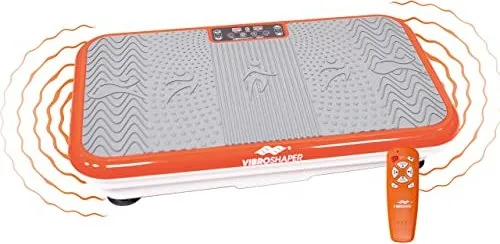
Vibro Shaper Vibračná platňa: Kompaktný tréning s veľkou všestrannosťou
Vibro Shaper Vibračná platňa je navrhnutá pre ľudí, ktorí chcú jednoduchý a priestorovo úsporný spôsob, ako pridať pohyb do svojej dennej rutiny. Toto domáce fitness zariadenie spája tréning založený na vibráciách s používateľsky prívetivým ovládacím panelom, diaľkovým ovládaním a odporovými gumami, vďaka čomu si môžete ľahko prispôsobiť cvičenie bez potreby veľkého tréningového vybavenia. Príručka k Vibro Shaper Vibračnej platni pomáha používateľom pochopiť, ako začať bezpečne, zvoliť správny režim a vyťažiť z každej tréningovej jednotky maximum.
Čo ju robí užitočnou
Jednou z najväčších predností tejto vibračnej platne je jej dvojitý prevádzkový systém. V manuálnom režime môžete nastaviť čas aj tempo podľa svojej úrovne pohodlia alebo tréningového cieľa. V automatickom režime zariadenie ponúka prednastavené programy, ktoré vás tréningom vedú. Vďaka tomu je vhodná pre začiatočníkov, ktorí chcú mať štruktúru, aj pre skúsenejších používateľov, ktorí uprednostňujú kontrolu.
Priložené odporové gumy pridávajú ďalšiu úroveň tréningu. Možno ich pripevniť na zadnú stranu platformy a používať počas cvičenia na aktiváciu rúk, ramien a hornej časti tela, zatiaľ čo spodná časť tela zostáva zapojená na vibrujúcom povrchu. Výsledkom je komplexnejšia rutina na malom priestore. Diaľkové ovládanie navyše zvyšuje pohodlie, pretože umožňuje meniť nastavenia bez prerušenia rytmu.
Podpora každodennej kondície
Vibro Shaper je určený na polohy podobné chôdzi, joggingu a behu, čo znamená, že používatelia môžu meniť postavenie chodidiel a tým meniť intenzitu tréningu. Vďaka tomu je platforma prispôsobivejšia než štandardný statický cvičebný prístroj. Ľahko sa tiež premiestňuje vďaka transportným kolieskam a bočnej rukoväti, takže jej uloženie po použití je jednoduché.
Tento produkt je jasne určený na praktické domáce používanie. Podporuje krátke tréningy, jednoduchú obsluhu a ľahké čistenie. Tréningové odporúčania priložené k produktu podporujú postupný pokrok, strečing pred cvičením a dôkladnú pozornosť držaniu tela. Vďaka tomu je vhodný pre ľudí, ktorí chcú stabilnú rutinu, nie zložitý fitness systém.
Poznámky
- Maximálne zaťaženie: 100 kg
- Používajte iba na rovnom a stabilnom povrchu
- Okolo zariadenia nechajte aspoň 100 cm voľného priestoru
- Nie je vhodné pre každého; zdravotný stav treba najskôr konzultovať s lekárom
- Najlepšie výsledky prináša pravidelné používanie a bezpečné tréningové návyky
Vyhľadať: 67 732 Manuály online


Zadajte značku alebo model